Dialer calls usually stop logging to HubSpot or Salesforce for one of four reasons: the integration lost its connection, the dialer user isn't mapped to a CRM user, the call couldn't be matched to a record, or the CRM refused to save the activity. Check them in that order, starting with the integration's connection status inside the CRM, because a broken connection explains a total outage while the other causes explain partial gaps.
Key Takeaways
- Check the causes in order: connection, user mapping, record matching, then permissions, validation, outcomes and limits.
- A total outage points to the connection or the user who authorized it; a partial gap points to matching, permissions or save errors.
- Phone numbers stored without a country code, or on the company instead of the person, are a frequent reason calls attach to nothing.
- A blank outcome usually means the dialer sent a value the CRM's call outcome list or picklist doesn't accept.
- After every fix, trace one real call into the CRM and confirm the record, owner, time and outcome.
Why does one missing call record matter?
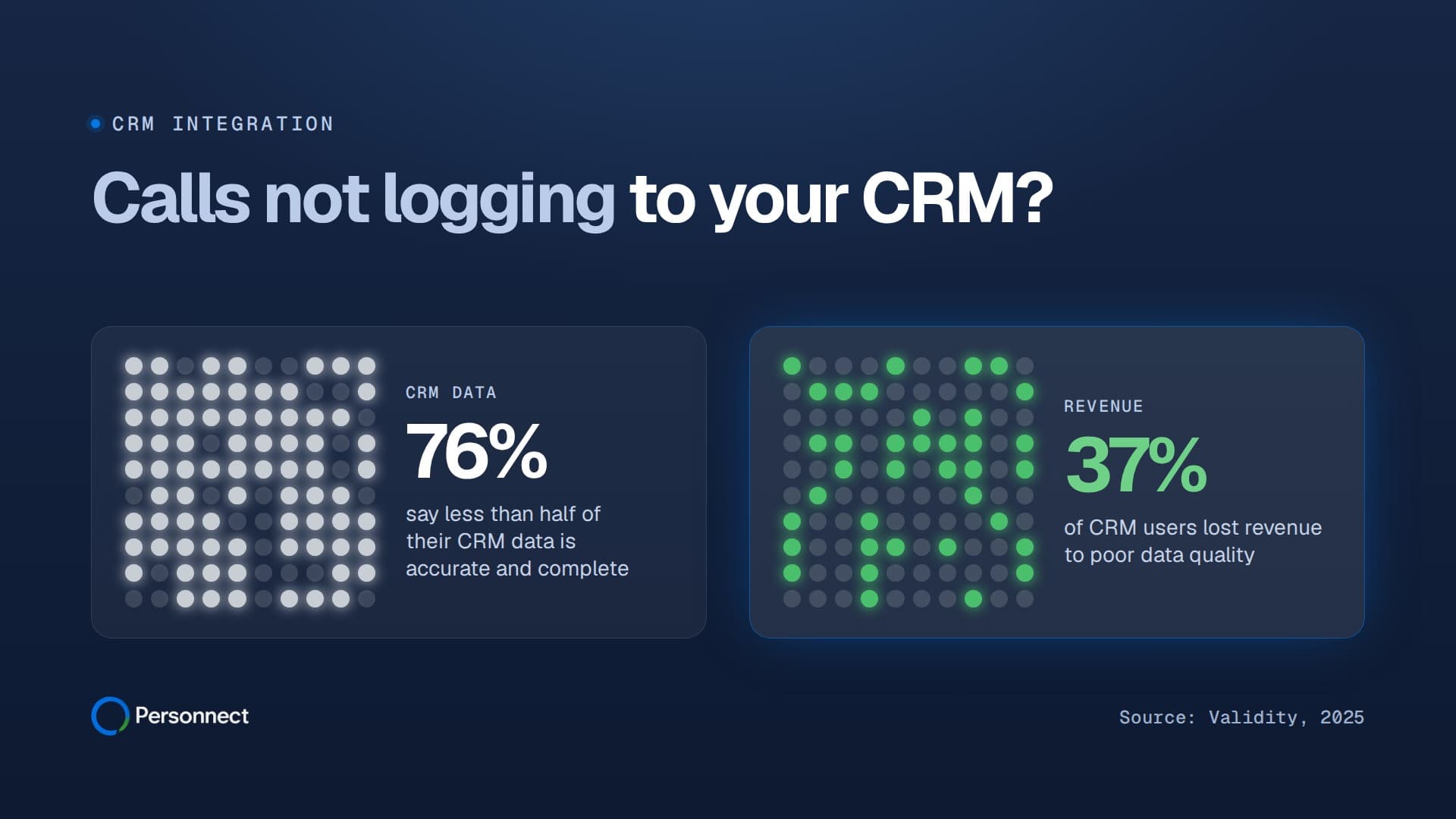
A call that never reaches the CRM is invisible to every report built on top of it, and most CRMs are already short on reliable data. In Validity's 2025 survey, 76% of respondents said less than half of their organization's CRM data is accurate and complete (Validity, 2025).
The cost shows up in revenue. The same Validity survey found 37% of CRM users had lost revenue as a direct result of poor data quality (Validity, 2025). A year earlier, 31% of CRM admins told Validity that bad data costs them at least a fifth of their annual revenue (Validity, 2024).
Errors also start at creation. In data quality scores Thomas Redman and colleagues collected from managers, 47% of newly created records carried at least one critical error, and only 3% of the scores reached even a loose bar for acceptable quality (Harvard Business Review, 2017). Redman also cites IBM's estimate that poor data cost the US economy $3.1 trillion in 2016 (Harvard Business Review, 2016).
Reps have little spare time to patch the gaps by hand. Salesforce found reps spend just 28% of their week actually selling, with deal management and data entry taking much of the rest (Salesforce, 2023). Its newer research puts non-selling work at 60% of a rep's time and says 42% of reps feel overwhelmed by too many tools (Salesforce, 2026). A dropped call pushes them back to manual logging, the pattern behind why your CRM is empty.
In what order should an admin check the causes?
Start with whatever could break every call at once, then work toward causes that break only some calls. A connection failure stops all logging; a mapping or matching problem hits certain reps or records; a save error or limit hits calls with certain data or at certain times.
First pin down the pattern: every call or some, one rep or all, since a date or always, missing or misplaced? Those answers point to a row in this table.
| Symptom | Likely cause | Fix |
|---|---|---|
| Nobody's calls log since a date | Connection expired or its user was deactivated | Reconnect under an active admin |
| One rep's calls missing or misassigned | Dialer user not mapped to a CRM user | Map the rep to the right user |
| Call logged but on no record | Number didn't match a stored number | Store numbers with country code |
| Call on the wrong copy of a person | Duplicate records | Merge, then test again |
| Lead calls seem to vanish | Lead was converted | Look on the contact and account |
| Calls fail for some reps only | Missing permission to log calls | Grant activity permissions |
| Calls fail on certain records | Validation rule or required field | Fix the rule or send the field |
| Call present, outcome blank | Outcome value not in the CRM list | Match values exactly |
| Gaps at busy times | API request limit reached | Check usage, spread syncs |
| No-answers or voicemails missing | Logging settings exclude them | Turn on logging for all types |
Is the integration still connected and authorized?
Check this first, because an expired or revoked connection stops every call from logging at once. In HubSpot, open Settings and navigate to Integrations > Connected Apps; HubSpot's guide says the attention section lists apps that have an expired connection, apps that are disconnected and apps with connection errors (HubSpot).
The same page shows who installed each app and its last activity date, the date data was last sent and received (HubSpot). A date that matches the start of your gap is a strong clue.
If the person who authorized the integration has left, their access can leave with them. HubSpot warns that removing a user who created a private app makes its association calls fail with the error USER_DOES_NOT_HAVE_PERMISSIONS (HubSpot). Salesforce says that if the user holding an opaque access token is deactivated, the token immediately stops working (Salesforce).
Reconnect under an active admin account, ideally a dedicated integration user no single employee owns.
Is each dialer user mapped to the right CRM user?
If calls log under the wrong rep, or one rep's calls never appear, the dialer user is probably mapped to the wrong CRM user or to nobody. A wrong mapping skews activity reports even when no call is lost.
HubSpot's calls API makes the owner explicit: the hubspot_owner_id field determines the user listed as the call creator on the record timeline (HubSpot). HubSpot also says deactivated users will be removed as options when setting the owner of a record (HubSpot), so a rep with a new login needs remapping in the dialer.
In Salesforce, a report can make calls look missing: if you add the Assigned To field to a custom activities report, tasks assigned to queues don't show up in it (Salesforce).
Why do calls land on no record or the wrong one?
The dialer has to find the record a call belongs to, and a mismatched number, a duplicate or a converted Lead leaves the call unattached or on a copy nobody opens.
Does the stored phone number match the dialed one?
Formatting is the usual culprit. One system stores +16025550134 while the other holds (602) 555-0134 with an extension, and a strict comparison finds no match. HubSpot's phone validation shows a clean target: with it turned on, numbers must meet E.164 format requirements, and +1 (888) 482-7768 would be saved as +18884827768 while still displaying in regional format (HubSpot).
Also check where the number lives. If it sits on the company or account rather than the person, or in a custom field the integration doesn't read, there's nothing for the call to match.
Are duplicates splitting the call history?
Two records for one person means calls can land on the copy your rep never opens. HubSpot automatically deduplicates contacts using email addresses, but its guide says companies created through API will not be deduplicated by the Company domain name property, and that includes installed third-party sync apps (HubSpot).
Salesforce duplicate rules can block or alert, but when several records are saved at the same moment, the records aren't compared with each other, only with records already in Salesforce (Salesforce). Merge duplicates, then test again.
Was the Lead converted?
A call logged on a Salesforce Lead isn't lost at conversion. Salesforce attaches all activities from the converted lead to the resulting account, contact, and opportunity, except activities initiated from a Sales Engagement cadence, and the leads become read-only records (Salesforce).
Look on the Contact and Account first, then make sure the dialer now calls the Contact. If calls reach the right person but miss the related account or opportunity, that's a lookup mapping problem, walked through in mapping Salesforce lookup fields for a power dialer.
Can the integration user actually create calls?
Missing permissions block calls quietly: the dialer tries to write, the CRM refuses, and nothing appears. It tends to hit some reps only, or starts after a role change.
In HubSpot, the Communicate permission controls the records a user can log an email, call, or meeting to (HubSpot).
In Salesforce, a logged call is a Task, which the object reference describes as a business activity such as making a phone call (Salesforce). Salesforce's troubleshooting for a missing Log a Call action starts from the 'Edit Tasks' and 'Edit Events' permissions in a profile or permission set (Salesforce), so confirm the integration user and each rep have them.
Are validation rules or required fields rejecting the call?
When calls fail only on certain records or with certain outcomes, look at validation rules and required fields. Salesforce explains that validation rules verify that the data a user enters in a record meets the standards you specify before the user can save the record (Salesforce).
A rule written for manual entry, such as requiring a comment whenever a task is marked complete, also rejects an automated call that arrives without that comment. Find the rule on the Task object, then either have the dialer send the field or exempt the integration user. Required custom fields fail the same way.
Why is the call logged but its outcome missing?
The call reached the CRM, but its outcome didn't match a value the CRM accepts, so the field stayed blank or the write was rejected.
HubSpot stores the outcome as a call disposition, and to set the call disposition, you need to use the internal GUID value, not the label a rep sees (HubSpot). HubSpot will ignore values for read-only and non-existent properties, so a misspelled custom property is dropped quietly. Once an outcome is deleted, it cannot be used in HubSpot tools (HubSpot). If someone deleted an outcome your dialer maps to, create a new one and remap it.
In Salesforce, call results often live in a picklist. If 'Restrict picklist to the values defined in the value set' is on, a value outside the list fails with INVALID_OR_NULL_FOR_RESTRICTED_PICKLIST, and Salesforce's fix starts with using API names rather than labels (Salesforce).
Personnect's native two-way HubSpot integration and Salesforce integration log the summary, transcript and outcome of every call and sync them to the CRM, so outcome mapping is one piece of a fuller record.
Could API limits be dropping calls at busy times?
Yes, when gaps cluster at peak hours or right after a big import. Both CRMs cap how much an integration can write, and calls that hit the cap fail unless the dialer retries them.
For OAuth apps distributed through its marketplace, HubSpot limits each account that installs an app to 110 requests every 10 seconds, and an app over its limit will receive a 429 error response for all subsequent API calls (HubSpot). The Connection insights tab on HubSpot's Connected Apps page shows app activity and API usage (HubSpot).
Salesforce counts API calls per 24-hour period across the whole org, and its limits are not on a per-user basis (Salesforce). Check the API Requests, Last 24 Hours item in the Organization Detail section of the System Overview page in Setup.
Volume adds up fast with parallel dialing. Personnect dials up to five lines at once per rep, and unanswered calls still verify your contacts, so even the calls nobody picks up produce records worth keeping in the CRM.
Are some call types filtered out on purpose?
If connected calls log but no-answers and voicemails never appear, the integration may be set to save only certain call types. Check the dialer's logging settings before chasing anything else.
In HubSpot, the call type property takes options based on the call types set in your HubSpot account, and hs_timestamp determines where the call sits on the record timeline (HubSpot). A wrong time zone can place a call where nobody scrolls.
How do you test one call end to end?
Make one real call after every fix, to a contact you control, and follow it into the CRM record.
- Pick a test contact with one record, no duplicates and an E.164 phone number on the person
- Confirm the integration shows as connected and its installer is an active user
- Confirm your dialer user maps to your own CRM user
- Place the call, let it connect, and choose an outcome that exists in the CRM
- Open the contact and find the call on the timeline or in the activity list
- Check the owner, timestamp, outcome and notes against what you did
- Repeat with a no-answer and a voicemail to confirm those types log
- If anything fails, read the integration's error log and the CRM's API usage before changing settings
What keeps call logging healthy after the fix?
Most of these failures return after a change somewhere else: an admin leaves, a new validation rule ships, someone renames an outcome, or a bulk import creates duplicates. Add the end-to-end test call to the checklist for any CRM change, and glance at HubSpot's Connected Apps page or Salesforce's API usage once a week.
Give the integration one named owner, and connect it through a dedicated user, so offboarding never takes call logging down with it. When you evaluate a dialer, ask whether it uses true two-way sync and exactly what it writes for each call. Personnect, for example, keeps call recordings for a year alongside the logged summary, transcript and outcome.
Frequently Asked Questions
Why do dialer calls show in HubSpot but not on the contact?
The call was probably logged without an association to that contact, usually because the phone number didn't match or matched a duplicate. HubSpot lets you log and manage calls on CRM records and on the calls index page (HubSpot), so look there for unattached calls, standardize the number, merge duplicates and test again.
Where should logged calls appear in Salesforce?
A logged call is a Task on the record. Salesforce says a saved call is captured as a completed activity in the Activity History for the record, and in Lightning it immediately shows under the 'Past Activity' section of the activity timeline (Salesforce). If it's absent there, check permissions and validation rules.
Can a dialer resync calls that failed to log?
That depends on the dialer. Ask whether it retries failed writes and whether you can resync a date range after fixing the cause. Fix the cause first, or the resync fails the same way.
Do you need a CRM to log calls from a parallel dialer?
No. With Personnect you can upload a list and it works as your outbound CRM, with the summary, transcript and outcome of every call logged and recordings kept for a year. Teams on HubSpot or Salesforce use the native two-way integrations, and any other CRM connects through CSV import and export or a direct integration on request.
Sources
- Validity validity.com/resource-center/the-state-of-crm-data-management-in-2025
- Validity validity.com/resource-center/the-state-of-crm-data-management-in-2024
- Harvard Business Review hbr.org/2017/09/only-3-of-companies-data-meets-basic-quality-standards
- Harvard Business Review hbr.org/2016/09/bad-data-costs-the-u-s-3-trillion-per-year
- Salesforce salesforce.com/news/stories/sales-research-2023
- Salesforce salesforce.com/sales/state-of-sales/sales-statistics
- HubSpot knowledge.hubspot.com/integrations/manage-your-connected-apps
- HubSpot knowledge.hubspot.com/user-management/remove-hubspot-users
- Salesforce help.salesforce.com/s/articleView?id=xcloud.remoteaccess_access_tokens.htm&language=en_US&type=5
- HubSpot developers.hubspot.com/docs/guides/api/crm/engagements/calls
- Salesforce help.salesforce.com/s/articleView?language=en_US&id=sales.task_considerations.htm&type=5
- HubSpot knowledge.hubspot.com/properties/phone-number-property-validation
- HubSpot knowledge.hubspot.com/records/deduplication-of-records
- Salesforce help.salesforce.com/s/articleView?language=en_US&id=sales.duplicate_rules_overview.htm&type=5
- Salesforce help.salesforce.com/s/articleView?language=en_US&id=sales.leads_notes.htm&type=5
- HubSpot knowledge.hubspot.com/user-management/hubspot-user-permissions-guide
- Salesforce developer.salesforce.com/docs/atlas.en-us.object_reference.meta/object_reference/sforce_api_objects_task.htm
- Salesforce help.salesforce.com/s/articleView?id=000382953&language=en_US&type=1
- Salesforce help.salesforce.com/s/articleView?id=sf.fields_about_field_validation.htm&language=en_US&type=5
- HubSpot knowledge.hubspot.com/calling/create-custom-call-and-meeting-outcomes
- Salesforce help.salesforce.com/s/articleView?id=000380951&language=en_US&type=1
- HubSpot developers.hubspot.com/docs/developer-tooling/platform/usage-guidelines
- Salesforce developer.salesforce.com/docs/atlas.en-us.salesforce_app_limits_cheatsheet.meta/salesforce_app_limits_cheatsheet/salesforce_app_limits_platform_api.htm
- Salesforce help.salesforce.com/s/articleView?id=000387963&language=en_US&type=1